Frequently Asked Questions
What Are Twitch Drops?
Twitch Drops are in-game rewards you can earn by watching participating livestreams on Twitch for a certain amount of time. Drops campaigns may run on the official World of Tanks channel, on content creator channels, or across the whole category.
There are three types of Twitch Drops:
- Guaranteed Drops: specific rewards earned after reaching the required watch time
- Mystery Drops: random rewards from a predefined pool, including rarer rewards like Premium vehicles
- Mission Drops: unlock in-game missions instead of immediate rewards
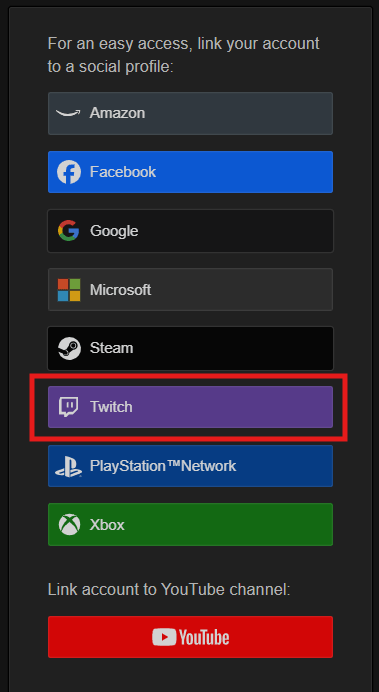
Use the Wargaming.net Account Management page to link your Wargaming.net and Twitch accounts before you can receive Twitch Drops rewards.
How do I connect my Twitch and Wargaming.net accounts?
- Log in to your Wargaming.net Account Management page.
- Click the Twitch button.
- Authorize the connection and confirm that Twitch appears as a linked platform.
Your Twitch account can only be linked to one Wargaming.net account at a time, so make sure the correct account is linked before joining a Drops campaign. Wargaming.net account should be seen in your Twitch account settings.
I play through Steam. Can I still receive Twitch Drops?
Yes. To receive Twitch Drops through Steam, your game account must first be linked to your email.
After that:
- Link your Wargaming.net account to Twitch
- Watch Drops-enabled streams
- Claim rewards through Twitch
Which streams count toward Twitch Drops progress?
Only livestreams with Twitch Drops enabled count toward rewards.
You can identify eligible streams by:
- The Drops Enabled tag on Twitch
- Campaign announcements on the portal
- Official World of Tanks and Contributor channels
Not all World of Tanks streams have Drops enabled, and recorded streams or VODs do not count.
How do I earn and track Twitch Drops?
Watch an eligible livestream for the required amount of time during an active Drops campaign. Each Drop has its own watch-time requirement, and after one Drop is earned, progress starts toward the next available campaign reward.
You can track progress through the Twitch progress bar, the Drops & Rewards section in your Twitch profile menu, or your Twitch Drops Inventory page.
Can I earn Drops faster by watching multiple streams?
No, watching multiple Drops-enabled streams simultaneously will not increase progress speed and may stop progress tracking entirely. To make sure progress is counted correctly, watch only one Drops-enabled stream at a time and keep the stream active in your primary browser tab.
How do I claim Drops and receive them in-game?
Once you complete the required watch time, Twitch will display a notification. Click Claim, and the reward will be delivered to your linked account. You can also claim rewards manually through your Twitch Drops Inventory.
Rewards are usually delivered automatically after claiming, but if you are already logged in, you may need to log out, restart the game, and log back in.
I claimed a Drop but haven’t received it. What should I do?
First, restart the game, re-log in to your account, and confirm that the correct Twitch and Wargaming.net accounts are linked.
If the issue persists, try this:
- reconnect your Twitch and Wargaming.net accounts
- verify that the stream had Drops enabled
- disable browser ad blockers
- make sure the stream was not muted
- confirm that the Drop was claimed in your Twitch Inventory.
Do I need Twitch Prime or Prime Gaming to receive Twitch Drops?
No, Twitch Prime or Prime Gaming memberships are not required to earn Twitch Drops.
Do all regions receive the same Twitch Drops?
Most Drops campaigns are shared across Europe, the Americas, and Asia-Pacific. However, some campaigns may be region-specific, only apply to certain channels, or have different availability periods.
Always check the campaign announcement for region details.
